Greenify *ROOT: Renew my Phone 2.0 beta 8

Download Greenify *ROOT: Renew my Phone 2.0 beta 8 APK for your Android Smartphone.

Current Version: 2.0 beta 8

Requires Android: 3.1 and up

Category: Tools

v2.0 beta 8 update:

v1.99

Most trivial receivers are no longer scanned in middle-to-high-end devices.

New setup guide for experimental features.

v2.0 beta 3 (beta channel)

Greenify now works on non-root devices! Try out the non-root working mode, without automatic hibernation.

v2.0 beta 4 ~ beta 7

“Hibernate Now” shortcut now works in non-root working mode.

Bugfixes.

v2.0 beta 8

Fixed an issue causing Tasker plugin not working for specified app.


Overview:

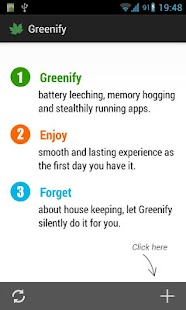
Never should your phone or tablet become slower and battery hungrier after lots of apps installed. With Greenify, your device can run almost as smoothly and lastingly as it did the first day you had it!


Featured as Lifehacker’s Top 1 Utility in 2013 Best Android Apps (http://goo.gl/1VMwnE), Android Authority’s Top 3 Best Root Apps (http://goo.gl/g0L0qZ).


Greenify help you identify and put the misbehaving apps into hibernation when you are not using them, to stop them from lagging your device and leeching the battery, in an unique way! They can do nothing without explicit launch by you or other apps, while still preserving full functionality when running in foreground, similar to iOS apps!


ROOT is required.

NOTICE: PLS DO NOT REPORT BUG AS REVIEW, since I could not contact you for further details. Please report bugs in the XDA forum (http://goo.gl/urHEa) or G+ community (http://goo.gl/MoszF).


IMPORTANT: Greenifying an app implies that you are aware that all the background functionality (service, periodic task, event receiver, alarm, widget update, push message) of this app will become out of service during the hibernation except when you are using this app.


NEVER greenify alarm clock apps, instant messaging apps unless you don’t rely on them. Please do verify the impact of greenified apps on which you heavily rely.


Compared to other popular tools aimed for the similar purpose, Greenify offers the following advantages:


◆ Unlike the “Freeze” feature in “TitaniumBackup Pro” that totally disable the app, you can still use your app as usual, share content with it. No need to freeze & defrozen it.


◆ Unlike “App Quarantine”, you can launch greenified apps in any way as usual. No more crafted app-launch widgets, no more manual disabling.


◆ Unlike “Autostarts”, you can benefit from almost all of its advantages, without needing to deal with the complexity and risk of obscure app components, and never lose functionality when app is actively running.


◆ Unlike any “XXX Task Killer”, your device will never fall into the cat-mouse-game of stealthy-running and aggressive killing, which unnecessarily consumes more battery juice.


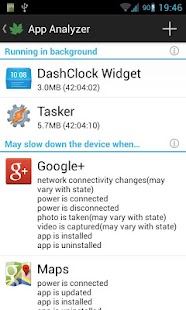
Note: Greenify do need a background persistent “Cleaner” service to put the greenified apps back into hibernation when you are not actively using them. It is designed and implemented in extremely lightweight, with an average RAM footprint at 3M in total, and nearly zero CPU and battery consumption.


In case you cannot install from Play Store: http://oasisfeng.com/Greenify.apk


=== PERMISSIONS ===


INTERNET: Needed by “Raise Your Voice” program to send back only small amount of anonymous statistics data, without privacy information. You can opt-out at any time.

READ SENSITIVE LOG: To analysis the wake up cause of greenified apps.

GET ACCOUNTS & WRITE SYNC SETTINGS: Control the account sync of apps if its sync task is too frequent.


=== FAQ ===


* Why not support Android 2.x?

* It seems that automatic hibernation is not working.

* Some of my greenified apps (e.g. Google Maps) seems not hibernating.

* I want to greenify system apps!

* De-greenified apps still got no push notification!

……

Read here: http://goo.gl/1F5pY


=== Beta Channel ===


See G+ community board: http://goo.gl/MoszF


=== Translation ===


All translations are open for improvement: http://goo.gl/TQAzx

(Please register first: http://goo.gl/ofhed)


=== Donation ===


If you love Greenify and want to donate, please consider the “donation version” http://goo.gl/fpz5l to try out fresh experimental features, such as:


* Greenify system apps

* Allow GCM push for hibernated apps

* Detect “who” woke the hibernated apps


Download Greenify *ROOT: Renew my Phone 2.0 beta 8 APK here.
Read more

Themer Beta BETA 1.25

Download Themer Beta BETA 1.25 APK for your Android Smartphone.

Current Version: BETA 1.25

Requires Android: 4.1 and up

Category: Personalization

vBETA 1.25 update:

*1.25

-Lots of bug fixes related to new app drawer.

-Added ability to hotspot to smart categories from Zooper and Everything Widget.

-Smart categories can now be assigned to gestures.

*1.24

-Zooper Widget is now fully integrated as part of Themer.

-Added Yahoo as default widget weather provider.

-Fix for unread and missed call counts.

-App drawer and Smart Categories bug fixes.

*1.22

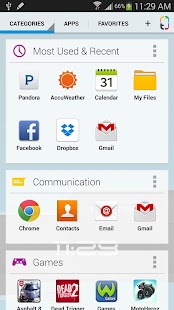
-New app drawer

-Smart Categories


Overview:

***As featured in The New York Times, Wired, Lifehacker, XDA-Developers, and CNET***

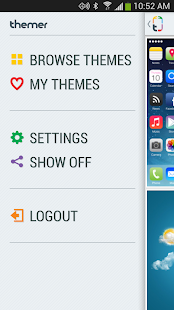
The iPhone can’t do this! A smarter, more personal homescreen in one click. Flip through our extensive library of free themes–each complete with icons, wallpapers, widgets, and more–and just click Apply. Your phone will instantly look amazing. We have themes that are futuristic, Christmas-y, grungy, exotic, and beautiful. Themer is the answer to what makes Android better.


Major upgrades in version 1.22 and 1.24: A completely customizable app drawer. White, sleek, and translucent, your theme peeks through. Smart categories auto-categorize your apps, making them easier to find and launch. Themer truly becomes more beautiful and more usable. We’ve also fully integrated Zooper Widget, allowing for more versatility in themes.


“Themer feels like a magic trick.” -The New York Times


“Themer will make your Android phone look amazing… Both attractive and functional.” -Wired


“My phone looks better than it ever has and I didn’t even have to do anything but press a couple of buttons. If I had to recommend any application to try out right now, this would be the one.” -PhoneDog


Features:

- All themes are free.

- Dozens of themes: Batman, Hello Kitty, Card UI, Nature, Breaking Bad, Star Trek, Super Mario, Space, and many more

- Easily go back to your old homescreen–though we doubt you’ll want to!

- All themes are customizable, or you can use them as they are.

- Themer Actions learn your app preferences. It doesn’t matter if you’re using Pandora or Spotify for music, or WeatherBug or AccuWeather for weather. Themer will learn what you like!


If you want some help, contact our excellent support team at http://support.themerapp.com.


By the way: Themer is still in beta, which means that we are working hard to fix bugs, improve performance, add new features, and increase compatibility with more devices. Thanks for your patience and support.


Download Themer Beta BETA 1.25 APK here.
Read more

ASTRO File Manager with Cloud ASTRO-4.4.580

Download ASTRO File Manager with Cloud ASTRO-4.4.580 APK for your Android Smartphone.

Current Version: ASTRO-4.4.580

Requires Android: Varies with device

Category: Productivity

vASTRO-4.4.580 update:

4.4.564

- Support for x86 devices

- updated to new Box API

4.4-543 – fixed several small bugs on several different platforms

4.4-541

- Improved memory usage

- Improved Skydrive support

4.4-528

- Indexed Searches. Search are now automatically indexed which greatly decreases search times for clouds and networks. Read more about how indexing works in the Description.


Overview:

ASTRO Cloud & File Manager is a FREE file explorer and has over 80 million downloads worldwide!

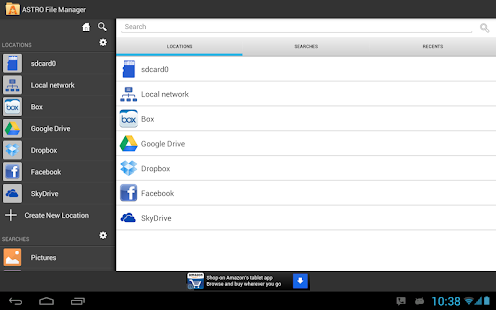
Organize, view and retrieve all of your pictures, music, videos, & documents; built-in app backup & task killer; manage all your files regardless of where they are stored (in a cloud or on another device such as):


* Phone

* Tablet

* Clouds (Dropbox, Google Drive, Facebook, Box & SkyDrive)

* PC, Mac, Linux (via networking)


Click here to ask to join our Beta Test Google + Group: http://plus.google.com/b/103095216021321867726/communities/106251776630475861309


Ever try to find a file but can’t remember where you put it? ASTRO has the most robust technology to search phones or search for files in the mobile world, giving you the ability to do anything from broad searches across all locations mentioned above for types of content (pics, music, videos, etc.) to very specific file searches based on file name, size, location, etc. And, with ASTRO’s unique “CLOUD HOPPING (TM)”, you can move files from one cloud to another in a single copy or move/paste – without having to download them first before sending to your destination cloud!


ASTRO now has support for Leef Bridge, a powerful, yet simple, innovative USB flash drive that allows users to easily transfer files to other devices (Android phones, tablets, Macs and PCs). Visit www.2leef.com/bridge for more information and a list of compatible devices.


What are some of the benefits to ASTRO’s new file Indexing functionality:

- After your first search, results are almost instantaneous across all indexed locations (mobile device, clouds, networked locations)

- If you are offline, you can still search for files that have been indexed.

- Eliminates redundant network calls in ASTRO, making some file search operations faster.

- Better file search, file browsing experience in areas with spotty or slow network coverage.


How does ASTRO’s new Indexing functionality work?

- As you browse through directories on your device, clouds or networked locations, ASTRO begins indexing your files in the background in order to speed up future searches you perform.

– It will also build your index whenever you do a search. It will build the index for your internal and external sd cards very quickly (typically under 15-20 seconds). Clouds or networked locations will take longer and also depends on the number of files in those locations.

- You can also choose to proactively index any of your other locations like clouds (Box, Dropbox, Google Drive, SkyDrive) and networked locations by doing a search on those locations or by going to Settings, Search index and click Rebuild index. Keep in mind if you choose to index a 500GB server you have at home, it may take a while. :)

– You can go to Settings, Set Default Search Locations to set your default locations.

– You can go to Settings, Search index and clear your index at any time as well.


- SWIPE SCREEN RIGHT to get to Clouds, Network Locations or Saved Searches fast

- SWIPE SCREEN LEFT to get to Tools (App Backup, Task Killer, SD Card Usage), Settings and Help


ASTRO File & Cloud Manager FREE gives you the ability to kill tasks or processes that burn battery life (Task Killer Tool) and easily backup apps (App Backup Tool) in case you lose or change phones.


FEATURES INCLUDE: file manager, phone download manager, content management, multiple cloud management / cloud storage manager with Facebook, Google Drive, Dropbox, Box and SkyDrive, android file browser, file and/or app backup, app manager, image and text viewers, networking, Bluetooth, SFTP, Zip Files, download manager, thumbnails, search files, task manager, attachments, and more.


Quick Start Guide, FAQ’s and Documentation: http://support.metago.net.


ASTRO supports 11 languages including: English, French, Spanish, Italian, German, Japanese, Korean, Traditional Chinese, Simplified Chinese, Russian & Portuguese.


Download ASTRO File Manager with Cloud ASTRO-4.4.580 APK here.
Read more

Mantano Ebook Reader Premium 2.4.8

Download Mantano Ebook Reader Premium 2.4.8 APK for your Android Smartphone.

Current Version: 2.4.8

Requires Android: 2.3 and up

Category: Productivity

v2.4.8 update:

2.4.8

- Library: Dropbox access is finally there!

- The app is now translated to Russian : many thanks to Andrey!

- Improved:

- Reader: Added confirmation popup when deleting annotations

- OPDS: Workaround for the specific file naming convention of books downloaded from the Project Gutenberg catalog

- Fixed:

- Crash when selecting a folder to move a file and pressing the “Back button” from the root folder (“/”)

- Minor bugs


Overview:

The best ebook reader on the market: user friendly, powerful, fast, highly customizable, this book reader provides unprecedented flexibility, speed and reading comfort.

Download thousands of free and paid ebooks, highlight excerpts, take notes in your books and contracts, listen to your books thanks to the Text To Speech function, organize your books and notes, add your favorite catalogs and much more!


This is a great ebook reader for students, professionals, eager readers with its many possibilities:

- an integrated reading tool that will surprise you with its smoothness and functional richness

- an advanced library to organize and index your ebooks

- a notes manager to bundle the notes of all your ebooks. At last, you will be able to organize and index them !

- a huge selection of bookstores can be set: one click access to thousands of books

- possibility to sync your library across all your devices and to share ebooks / notes through the paid service Mantano Cloud


Overview


• Support of the most common ebook formats (EPUB2, PDF)

• Support of Adobe DRM, allowing to read ebooks protected against hacking

• Integrated OPDS browser, with the option to add your own URL addresses to customize your bookstore area

• Integrated File explorer, great for importing specific ebooks by browsing your device

• Integrated multi-books notes manager

• Customer support

• Compatible with Mantano Cloud service


Reading


• Realistic simulation of page turning

• Text to speech

• Customize the display of EPUB books thanks to predefined or custom created themes: font, line height, colors, etc.

• Advanced support of PDF books: Fast vertical and horizontal scroll, Pan & Zoom, manual and automatic crop to reduce margins if necessary, optimized display speed

• Advanced Search function displaying the list of all instances of a word found in the book

• Many ways to annotate your ebook: highlighting, underlining, adding text notes or sketch notes

• Pinable navigation panel for a quick access to the table of content, bookmarks, highlights and notes

• Edition of bookmark titles to create your own table of content

• Creation of a tailored lexicon from the words you searched in the dictionary

• Night mode


Organizing your library


• Index your books by tags and rating

• Group your books into your personal collections

• Book filtering functions by tags, collections, authors, publishers, formats…

• Several display modes: compact list, detailed list and thumbnails


Organizing your notes


• Index your notes by tags and rating

• Group your notes into your personal collections

• Notes filtering functions by tags, collections, books, type

• Create review sheets from a selection of notes in different books

• Direct access from a note to the corresponding page in the book with one click


More features with Mantano Cloud (requiring a separate paid subscription on http://cloud.mantano.com):


• Sync your library between your devices: Switch between your phone and tablet and always find your books, annotations, notes, reading positions, collections, tags, ratings, bookmarks, discussions, contacts along with you, in their most recent state.

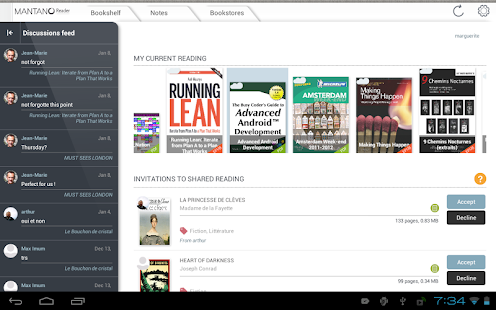
• Shared reading : Transform your books and documents into digital reading circles by sharing annotations and learn from each others’ experience. Share your ebooks with your friends, learn from their notes, discuss with them. Retrieve all notes, select the most interesting threads and export them to a “review sheet”.


Other ebook reader apps:

- Supporting Adobe DRM: Aldiko, Kobo, Bluefire

- Not Supporting Adobe DRM: Moon + Reader, RepliGo, Laputa, Cool Reader, ezPDF, Adobe Reader, FBReader.


Tags: book, ebook, book reader, ebook reader, epub reader, pdf reader, ebook speech, dictionary, lexicon, library, bookstore, opds, tts, epub, pdf, ebook annotate.


Download Mantano Ebook Reader Premium 2.4.8 APK here.
Read more

Screenshot Ultimate Pro 2.8.4

Download Screenshot Ultimate Pro 2.8.4 APK for your Android Smartphone.

Current Version: 2.8.4

Requires Android: 2.1 and up

Category: Tools

v2.8.4 update:

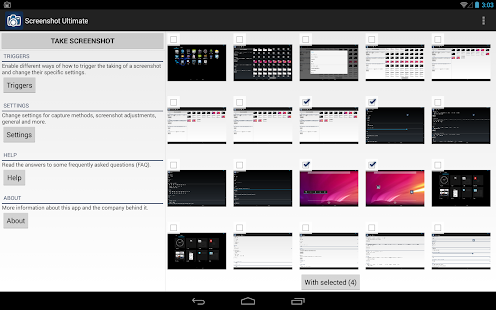
- 6 new screenshot capture methods!

- Added tablet layout!

- Added optional auto screenshot rotation

- Added option to change screenshots preview grid size

- Improved screenshots for Android ICS (4.0) and higher

- Improved layout for Screenshot Ultimate

- Improved capture engine: faster and more reliable

- Fixed bug media scanner / gallery

- Fixed bug cropping screen shot

- Lots of new features!

- Lots of bug fixes!


Overview:

Now you can take a snapshot easily on your Android device (no root required: read the faq how). Take screenshots on your tablet, phone or other Android device without ads!


Share, draw, add text to a screenshot or even send/edit multiple screenshots!


★Most complete screenshot app!★


Why is Screenshot Ultimate Pro the perfect screen capture app? Well, it has the most features and supports over 14 different capture methods. If this app can’t take a screenshot no other screenshot app will!


We support rooted and non-rooted devices; however, if you have a non-rooted phone you might have to run a small app on your computer to enable screen shooting functionality. Read the FAQ for more information.


Note

If you can’t get the app to work please email us and don’t post it in the reviews since we can’t respond to reviews. Thanks.


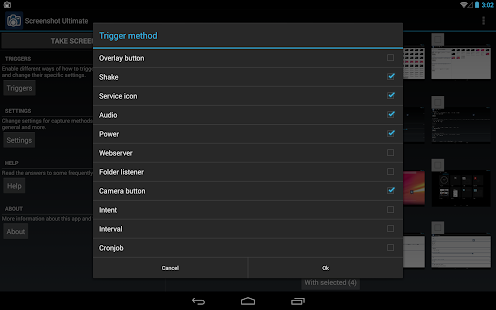
Trigger methods

- Overlay icon which is visible on top of all screens (icon, button or custom icon)

- Shake

- Service icon click

- Audio

- Power connect/disconnect

- Folder listener

- Webserver

- Camera hardware button

- Long click search hardware button

- Custom shortcut

- Widget button

- Button inside the app

- Intent (Tasker support)

- Interval

- Cronjob


For every trigger separately you can set: do after, vibrate, sound, toast, timeout, countdown and more!


Features

- No ads!

- Edit taken screenshot: draw, add text, crop, add information (android version, wifi ip, date/time, etc), rotate, mirror, switch colors, overlay an image, use your own editor, effects (sepia, grayscale, etc)

- Share taken screenshot: use your custom app for sharing (Email, Picasa, Memo, etc), or upload to Imgur, Glowfoto, ImageShack, POST to server, TwitPic, Tumblr

- View all taken screenshots and select multiple for sending, create zip, edit and more!

- Automatically apply “Screenshot Adjustments” to every taken screenshot

- Multiple capture methods (over 14) with an auto detect option so you can select the best option

- Set default save folder and filename and image format (PNG or JPEG)

- Tablet support!

- Set optional custom shutter sound

- More!


FAQ

What can I do with the “Folder listener” trigger?

If your device has built-in screenshot capability you can set the app to listen for changes to a folder. As soon as an image is created in that folder Screenshot Ultimate Pro will also trigger (for editing, saving to your own folder, etc). You could also use another screenshot app, like Screenshot UX, Screenshot Free, Screenshot and Draw, Screenshot ER or Screenshot It, and use Screenshot Ultimate Pro to handle the editing and saving.


No “Capture Method” is available for my device!

This is normal if your device isn’t rooted. It’s the way how the Android security model works; it just doesn’t allow taking a screenshot on some devices. However, you can enable screenshot functionality on your device by enabling it through a computer. To see how you can do this go to “Screenshot Ultimate Pro” > “Settings” > “Capture methods” > “No capture method help”. You can email the manual to yourself so you can complete it on your computer (Windows, Linux or Mac OSX).


How to…

Contact us by email and we’ll try to help you. Just remember, if you post it in the review we can’t respond and help you, so please contact us by email.


Visit us on: http://www.icecoldapps.com/

Follow us on Twitter: https://twitter.com/IceColdApps

Like us on Facebook: http://www.facebook.com/IceColdApps


What are the permissions for?

- INTERNET: the uploading to Imgur

- RECORD_AUDIO: for the audio trigger (blow in the microphone to take a screenshot)

- SYSTEM_ALERT_WINDOW: for the overlay icon (click it to take a screenshot)

- RECEIVE_BOOT_COMPLETED: optionally auto start the app on boot

- WRITE_EXTERNAL_STORAGE: save the screenshots

- VIBRATE: alert when a screenshot was taken

- WAKE_LOCK: optionally set your device to stay awake when the screenshot app is running

- CHECK_LICENSE: check whether you bought the app


Download Screenshot Ultimate Pro 2.8.4 APK here.
Read more

The Tribez 1.59

Download The Tribez 1.59 APK for your Android Smartphone.

Current Version: 1.59

Requires Android: 2.2 and up

Category: Arcade & Action

v1.59 update:

- Hey Chief, the winter holidays came to The Tribez! Meet the holidays together with the villagers!

- Accomplish new exciting quests and decorate your village with the funny buildings!

- There’s a snowmen contest on the Winter glade! Participate in the competition by building a huge Dino-snowman and collect Snowflakes! Invite your neighbours to help you! Visit your neighbours to assist them in building snowmen to earn even more Snowflakes!


Overview:

“…the Tribez is one of the most enjoyable and in-depth city-builders

we’ve seen”

- Games.com


Tribez is not just a game! Tribez is an adventure, where you travel to a

distant past full of secrets, mysteries and many hours of addictive

discovery in an unknown but beautiful world!

Privacy Policy – http://www.game-insight.com/legal/privacy/


Official Page on Facebook: http://www.facebook.com/TheTribezCommunity

Game Trailer: http://youtu.be/ZoXWVgCHrSs


You have been invited to visit a mysterious, primitive world inhabited by a

peace-loving people who have been concealed behind a miles-deep portal since

time immemorial. Build your own stone-age village and explore territories

hidden behind mountains and seas. Your tribe believes you were sent by

the gods. Lead them to great prosperity!


Help the leaders of neighbouring tribes, develop your country’s economy,

discover new lands, and populate them with your tribesmen! Tribez is a world

that feels real and alive!


- Gorgeous graphics and lively animations make the prehistoric world come to

life on your tablet and smartphone.

- Truly endless possibilities to develop your own stone-age empire

across 6 large islands

- More than 100 functional and decorative buildings, 14 kinds of resources

- More than 700 captivating quests: search for treasure and artifacts,

discover distant islands, send expeditions to mysterious caves

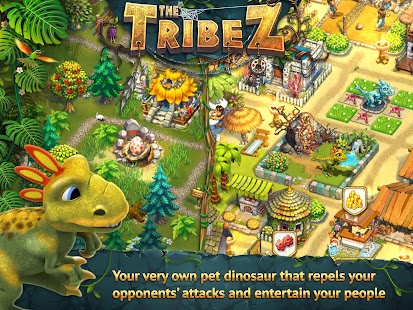
- And, you can also train your own dino!”

Privacy Policy – http://www.game-insight.com/legal/privacy/


Download The Tribez 1.59 APK here.
Read more

DCikonZ Light 1.4.4

Download DCikonZ Light 1.4.4 APK for your Android Smartphone.

Current Version: 1.4.4

Requires Android: 2.1 and up

Category: Personalization

v1.4.4 update:

200 new icons + fixes and updates.


Overview:

This is a version of DCikonZ Theme for screens with a resolution up to 800x480px. Icons are 72x72px size. If look blurred – Install a normal version.


This is theme & icons pack for most popular Launchers. This is NOT Launcher.

You MUST have installed one of this Launchers to use this theme: “ADW Launcher”, “Nova Launcher”, “Apex Launcher” or “Go launcher EX”.


No ads, no permissions and it’s free :) The main thread of this project is the XDA forum:

http://forum.xda-developers.com/showthread.php?t=1972383


—- Please, click “MORE” and read how to apply this theme —-


Elegant and toned theme & icons pack for ADW, Nova, Apex, Holo, Atom and Go launcher.

Clock widget is NOT part of theme, this is “HD Widgets” available in Google Play :) .


» FEATURES «


- 4400 HD icons and growing.

- 4 Wallpapers, please download my DCwallpaperZ app for more (for Nova this is necessary)

- Dock for Go Launcher.

- Works with Nova, Apex, Go, Holo, Atom, SmartLauncher, Espier4 and ADW Launcher. For TSF is separately app.


» INSTRUCTIONS «


To apply the theme:

- Nova: press MENU > Nova Settings > Look and feel > Icon Theme …

- Apex: press MENU > Theme settings …

- Go Launcher: MENU > Themes > Installed …

- ADW: press MENU > ADW Settings > Themes Preferences …


… Choose the DCikonZ Theme from the list and apply it.


To change app’s icon on homescreen:


- Nova/Apex: Long press app icon > Edit > tap the icon > Icon Pack > Select theme and you can select any icon.

- Go LauncherEX: Long press app icon > Replace > Select theme from the top left corner dropdown > Select any icon.

- ADW Launcher: Double tap app icon > Edit > tap the icon > ADWTheme IconPacks > Select theme and you can select any icon.


If your launcher does not support theme/icons changing – it will not work.


** Please rate and comment **


Tag: GSLTHEME


Download DCikonZ Light 1.4.4 APK here.
Read more